

by ZSuite Tech on Aug 27, 2026, 3:37:15 PM
FI Super Admins can now block other FI users from accessing the platform. This is useful for quickly revoking access when needed — and just as easy to reverse if a user is blocked by mistake. For example, when an employee leaves the bank or moves to a role no longer requiring ZEscrow access, Super Admins can block their access in seconds — no need to delete the account or lose historical data.
How to block a user:
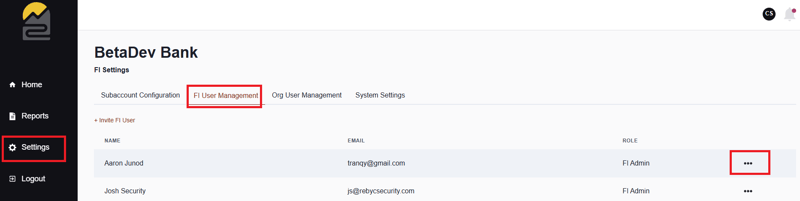
- Go to Settings > FI User Management
- Find the user you'd like to block
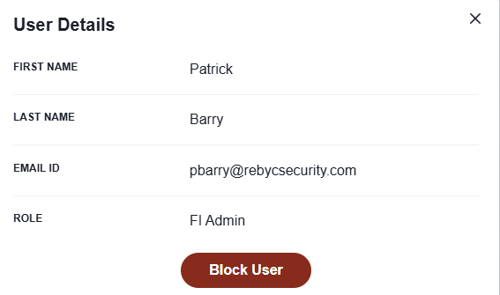
- Click the "…" menu next to their name and select "User Details"
- Select "Block User"
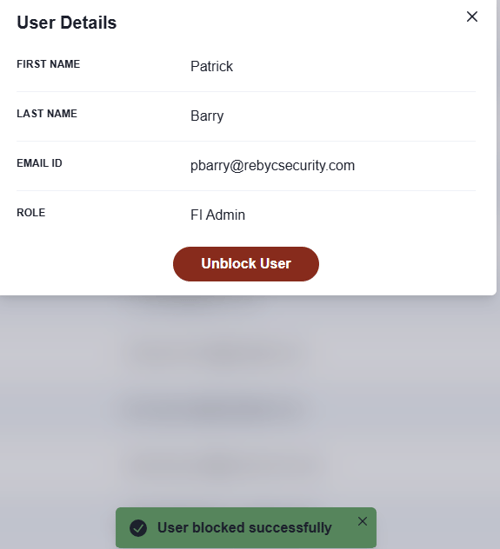
To unblock a user, simply follow the same steps and select "Unblock User" instead.
See screenshots below for a step-by-step visual guide.