


by ZSuite Tech on Jul 9, 2026, 10:50:02 AM
New Feature: FI Super Admin Access for SSO Users
Financial institutions using Single Sign-On (SSO) can now assign a Super Admin permission level to their users directly through their existing identity management setup.
What's New
FIs now have three available user roles within ZEscrow:
-
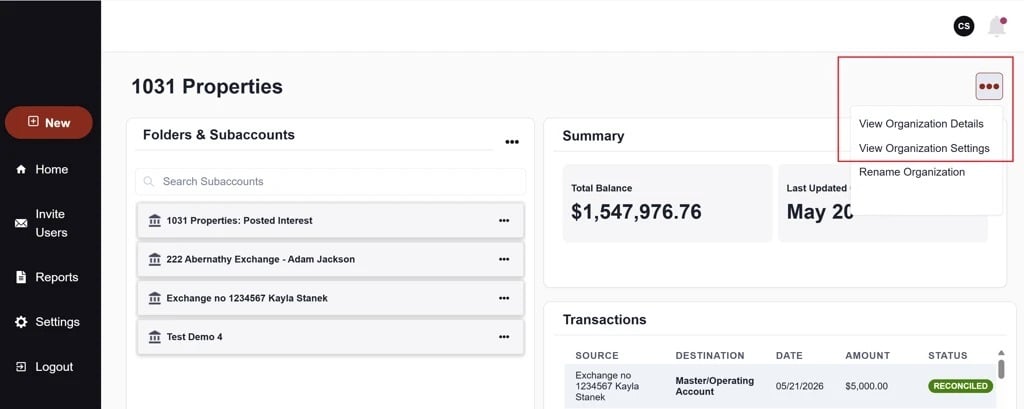
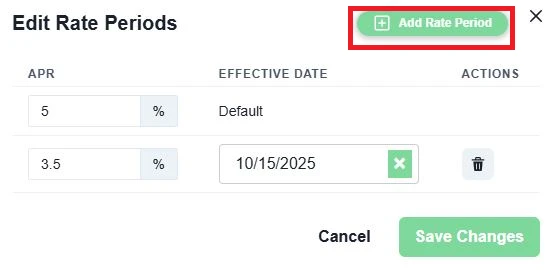
FI Super Admin: Full administrative access, including editing interest rates on existing interest configurations, viewing organization details, and updating statement types.
-
FI Admin: Standard administrative access.
-
FI Read Only: View-only access.
User groups are managed by the FI and communicated to ZSuite Tech, keeping role administration within your existing workflows.
IT Setup Instructions
To enable Super Admin access for SSO users, your IT team will need to complete the following steps:
-
Configure your identity provider to allow AD groups to pass through with the user's SAML token.
-
Create the following user groups: ZEscrow_SuperAdmin, ZEscrow_Admin, and/or ZEscrow_ReadOnly.
-
Add users to the appropriate groups. We recommend adding an existing FI user to the new Super Admin group first for testing purposes.
-
ZSuite will verify the groups are visible in the production environment.
-
Send your user group information to clientsupport@zsuitetech.com.
For Azure SSO configuration, refer to Microsoft's setup guide for adding group claims to tokens for SAML applications: View Documentation